
Setup MySQL Replication Master-Slave Mode
MySQL Replication is a method, which uses for sync database two or more replica servers. Typically it's known as "Master-Slave" Replication.
Key Architecture Takeaways
- ›Point 1: Hypervisor & container orchestration blueprint for Setup MySQL Replication Master-Slave Mode.
- ›Point 2: Architecture covers resource isolation, networking bridges, and high availability.
- ›Point 3: Optimized for Proxmox VE 8, modern Docker 27+, and kernel cgroups v2.
High Availability Cluster Recommendation
In modern virtualized datacenters (Proxmox VE 8.x), ensure guest configurations utilize VirtIO SCSI Single controllers with IOThread enabled, and isolate cluster corosync traffic onto dedicated 10GbE VLANs.
MySQL Replication is a method, which uses for sync database two or more replica servers. Typically it's known as "Master-Slave" Replication.
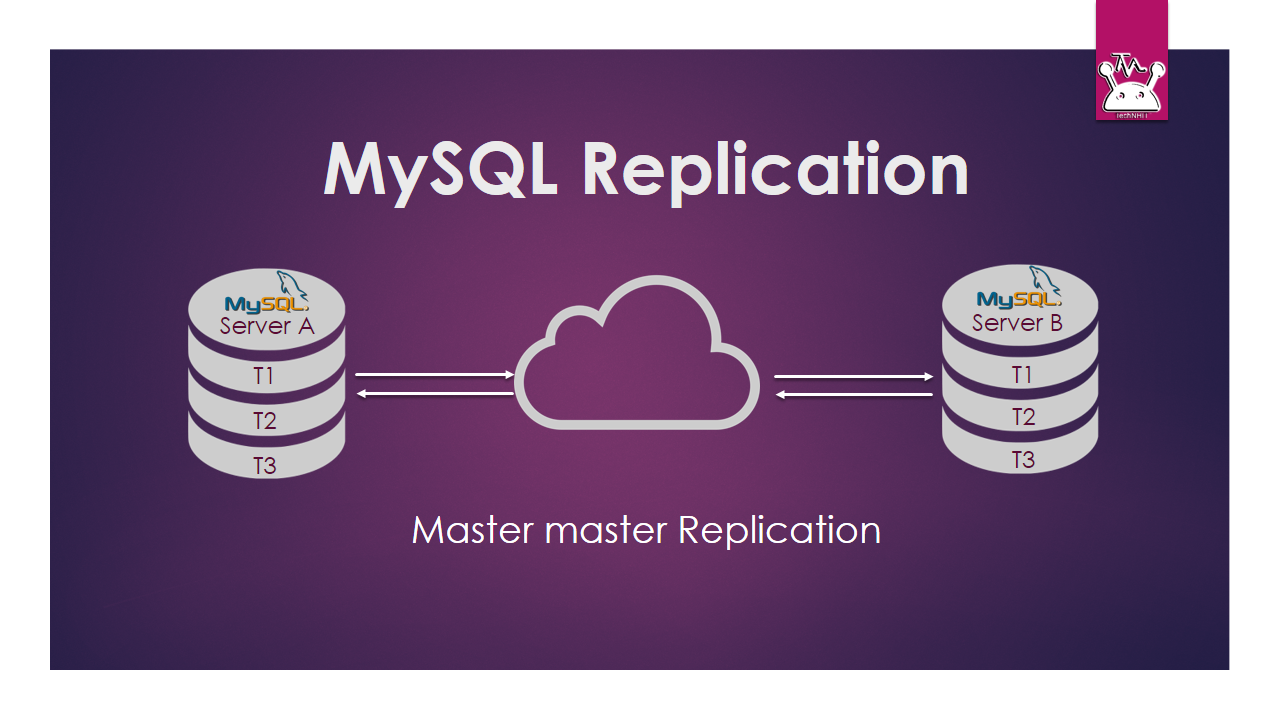
We have extended this configuration from Master-Slave to Master-Master Mode. Generally, in Master-Slave Mode there is a one master server with read write access. And one or more replica servers that only replicate the master. In a simple word, any thing changes in the master server is reflected on slaves but any changes in slaves do not reflect on the master. But in Master-Master mode replication is take effect both master to slave and slave to master. That's why it's called Master Master Mode.
So, now we start config with Master-Slave mode and finally convert it to Master-Master mode.
Environment and Prerequisites for MySQL Replication:
- Ubuntu 16.04. - MySQL 5.7
The examples in this article will be based on two Ubuntu servers.
- Server A (Master) -> IP (10.0.50.54) - Server B (Slave) -> IP (10.0.50.55)
Steps for MySQL Replication Master-Slave Mode:
 Mysql Replication
<script async src="//pagead2.googlesyndication.com/pagead/js/adsbygoogle.js"></script>
<ins class="adsbygoogle" style="display: block; text-align: center;" data-ad-layout="in-article" data-ad-format="fluid" data-ad-client="ca-pub-8190450325503411" data-ad-slot="2118052253"></ins>
<script>
(adsbygoogle = window.adsbygoogle || []).push({});
</script>
Mysql Replication
<script async src="//pagead2.googlesyndication.com/pagead/js/adsbygoogle.js"></script>
<ins class="adsbygoogle" style="display: block; text-align: center;" data-ad-layout="in-article" data-ad-format="fluid" data-ad-client="ca-pub-8190450325503411" data-ad-slot="2118052253"></ins>
<script>
(adsbygoogle = window.adsbygoogle || []).push({});
</script>
Step 1:--- Install and Setup MySQL Master Configuration:
- ›Installing MySQL
The Ubuntu 16.04 LTS repositories come with version 5.7 of MySQL, go to terminal and type:
$sudo apt install mysql-serverRest of article we assumed that, you have setup two identical nodes running MySQL, which can talk to each other over a private network, and that the nodes have the above IPs:
- ›Update Master Server config
In the file /etc/mysql/mysql.conf.d/mysqld.cnf uncomment or set the following. open the file with an editor.
$ sudo nano /etc/mysql/mysql.conf.d/mysqld.cnf

bind-address = 10.0.50.54
server-id = 1
log_bin = /var/log/mysql/mysql-bin.log
- Restart The MySQL Server. - Create a Mysql User for Replication
$ sudo service mysql restartWe need a user that connects to the master. This account generally used in the slave when the slave connects to master. The account needs REPLICATION SLAVEprivilege. Here we're using the username.replica.
-
Lock The Master
$ mysql -u root -p Password: mysql> CREATE USER 'replica'@'10.0.50.55' IDENTIFIED BY 'yourpassword';
Query OK, 0 rows affected (0.00 sec)
mysql> GRANT REPLICATION SLAVE ON *.* TO 'replica'@'10.0.50.55';
Query OK, 0 rows affected (0.00 sec)

mysql> FLUSH TABLES WITH READ LOCK; Query OK, 0 rows affected (0.00 sec)
<blockquote>
Note that this lock is released either when you exit the mysql CLI client, or when you issue UNLOCK TABLES. The lock needs to remain in place until the mysqldump is complete.</blockquote>
- ›View and Note Down Master Log Position
mysql> SHOW MASTER STATUS;
+------------------+----------+--------------+------------------+-------------------+
| File             | Position | Binlog_Do_DB | Binlog_Ignore_DB | Executed_Gtid_Set |
+------------------+----------+--------------+------------------+-------------------+
| mysql-bin.000001 | 674      |              |                  |                   |
+------------------+----------+--------------+------------------+-------------------+
1 row in set (0.00 sec)- ›Dump the All database of Master
$ mysqldump -u root -p --all-databases --master-data > dbdump.sql- ›Unlock Master Database
mysql> UNLOCK TABLES;- ›Copy Dumped database to Slave Computer
Here we are using scp command to copy the database to slave computer.
$ scp dbdump.sql 10.0.50.55:/tmpStep 2:--- Setup MySQL Slave Configuration:
We assumed that you have installed MySQL on the slave.
- ›Setup Slave Server Configuration
Similarly like master, In the file /etc/mysql/mysql.conf.d/mysqld.cnf uncomment or set the following. open the file with an editor.
$ sudo nano /etc/mysql/mysql.conf.d/mysqld.cnfbash bind-address = 10.0.50.55 server-id = 2 log_bin = /var/log/mysql/mysql-bin.log
Similar to master set bind-address, server id (here we use id 2 this time). Though binary log is optional. But it is good practice to set the log for future reference in case it acts as a master in future.


- **Restart The MySQL Server.**
bash $ sudo service mysql restart
- **Import Dump Database to Slave**

Now it's time to import the master dump database to the slave which we stored earlier into /tmp directory.
bash $ mysql -u root -p < /tmp/dbdump.sql
- **Set Slave to Communicate Master Database**bash $ mysql -u root -p
Type your mysql root password
mysql> STOP SLAVE;
Query OK, 0 rows affected, 1 warning (0.00 sec)
bash mysql> CHANGE MASTER TO -> MASTER_HOST='10.0.50.54', -> MASTER_USER='replica', -> MASTER_PASSWORD='yourpassword', -> MASTER_LOG_FILE='mysql-bin.000001', -> MASTER_LOG_POS=674; Query OK, 0 rows affected, 2 warnings (0.01 sec)
Change the above blue marked parameter as per your value.bash mysql> START SLAVE; Query OK, 0 rows affected (0.00 sec)
Now your slave is ready to sync with the master database. Whichever changes occur in master database slaves accept a reply from the master and update the slave.

You can show slave status using the following command.
bash mysql> SHOW SLAVE STATUS\G
## Extended Setup for Master-Master MySQL Replication:
[](https://www.technhit.in/wp-content/uploads/2017/07/master-master.png)
<hr />
This extended setup is optional. If you want to replicate your server both way then follow configuration.
- **Prepare your slave as Master **
Login slave server and follow the steps. in our case we login server Bbash $ mysql -u root -p
mysql> CREATE USER 'master'@'10.0.50.54' IDENTIFIED BY 'masterpasswored'; Query OK, 0 rows affected (0.00 sec)
mysql> GRANT REPLICATION SLAVE ON . TO 'master'@'10.0.50.54'; Query OK, 0 rows affected (0.00 sec)
- **View Log Position**bash mysql> STOP SLAVE;
mysql> SHOW MASTER STATUS; +------------------+----------+--------------+------------------+-------------------+ | File | Position | Binlog_Do_DB | Binlog_Ignore_DB | Executed_Gtid_Set | +------------------+----------+--------------+------------------+-------------------+ | mysql-bin.000004 | 154 | | | | +------------------+----------+--------------+------------------+-------------------+ 1 row in set (0.00 sec)
Note down the above information for future use.


- **Setup your master as slave**

Login server A which you previously set as master and then follow the steps.
bash $ mysql -u root -p Type your mysql root password
mysql> STOP SLAVE;
Query OK, 0 rows affected, 1 warning (0.00 sec)
bash mysql> CHANGE MASTER TO -> MASTER_HOST='10.0.50.55', -> MASTER_USER='master', -> MASTER_PASSWORD='masterpassword', -> MASTER_LOG_FILE='mysql-bin.000004', -> MASTER_LOG_POS=154; Query OK, 0 rows affected, 2 warnings (0.01 sec)
mysql> START SLAVE;
Query OK, 0 rows affected (0.00 sec)
Now your both Server ready to talk each other. This mode is known as master-master replication mode.
Conclusion:
As of now, you see that, first we have created a master-slave MySQL Replication. It is a one-way replication. Therefore we convert it master-master replication with few extended setup and configuration. Hope this article helpful for you.