
C Operator and Precedence Table
**I**n general, we know that Operator is a person who operates equipment or a machine. for a programming language, Operator is a symbol that tails compiler or an interpreter to perform specific mat...
Key Architecture Takeaways
- ›Point 1: Core computer science and engineering computing concept: C Operator and Precedence Table.
- ›Point 2: Detailed trace of memory representation, algorithmic complexity, and control structures.
- ›Point 3: Includes portable ISO C (C17/C23) code examples verified with modern GCC and Clang.
Compiler & Toolchain Modernization
While legacy educational environments used 16-bit DOSBox Turbo C++, all code presented here adheres to standard ANSI/ISO C standards. You can compile these programs cleanly on modern Linux, Windows (MSYS2/WSL), or macOS using:
> gcc -Wall -Wextra -O2 program.c -o program
> ./program
> ```


---

**I**n general, we know that Operator is a person who operates equipment or a machine. for a programming language, Operator is a symbol that tails compiler or an interpreter to perform specific mathematical or logical / relational manipulation. Unlike others programming language C or C++ has a wide range of operator to perform the various operation. To facilitate better understanding about operator we classified the operator as:


- Arithmetic Operators

- Increment and Decrement Operators

- Assignment Operators

- Relational Operators

- Logical Operators

- Conditional (ternary)  Operators

- Bitwise Operators

- Special Operators

## C Arithmetic Operator:


- Addition or Unary Plus (+),

- Subtraction or Unary Minus (-),

- Multiplication (*),

- Division (/),

- Modulus or reminder or a division (%)

Above all are categorized under C arithmetic Operators. It works with two Operand.  The operand is a variable or a constant for example *x=a+b* here *a* and* b* are the operand of the operator (+).

## 1

# Example Program  : Using Arithmetic Operators
c #include <stdio.h> int main() { int a = 10,b = 2, c; clrscr(); c = a+b; printf("a+b = %d \n",c);
c = a-b; printf("a-b = %d \n",c); c = ab; printf("ab = %d \n",c); c=a/b; printf("a/b = %d \n",c); c=a%b; printf("Remainder when a divided by b = %d \n",c);
getch(); return 0; }
**Output**c <samp>a+b = 12 a-b = 8 a*b = 20 a/b = 5 Remainder when a divided by b=0
</samp>
## Increment and decrement operators


- Increment operator (++)

- Decrement operator (- -)

In general C programming has increment ++ and decrement -- to step up  and step down the value of an operand (constant or variable) by 1.

Assume that you have a variable a holds value 5, then a++ step up the value by 1 after execution it will be 6. similarly, a-- step down the value of a by 1 after execution it will be 4.  Here another thing I want to highlight that the operator has two modes one is pre-increment and another is post-increment.

##  2

# Example Program: Let's focus on pre-increment bellow code block:
c #include<stdio.h> void main() { int a=5;b,c; //here value of a =5
b=++a; //here pre-increment the value of a first then //asign to variable b now value of a is 6 and // value of b is 6
c=a+b; // here c= 12
printf("The Value of a=%d, b=%d, C=%d",a,b,c);
getch(); }
Output:

a=6, b=6, c=12

##  3

# Example Program: Now focus on post- increment bellow code block:
c #include<stdio.h> void main() { int a=5;b,c; //here value of a =5
b=a++; //here post-increment occur the value of a // first assign to b then increase by 1 // now value of b is 5 and value of a is 6
c=a+b; // here c= 11
printf("The Value of a=%d, b=%d, C=%d",a,b,c);
getch(); }
Output:
a=6, b=5, c=11
## C Assignment Operators
An assignment operator is used for assigning a value to a variable. The most common assignment operator is =
******Pictorial Representation :**
[](https://www.technhit.in/wp-content/uploads/2016/09/assignment.gif)
## **Shorthand technique of assignment operator:**
A shorthand operator is a shorter way to express an assignment expression.
<table border="1" summary="List of all assignment operators in C programming" width="403" cellspacing="1" cellpadding="1">
<thead>
<tr>
<th scope="col">Operator</th>
<th scope="col">Example</th>
<th scope="col">Same as</th>
</tr>
</thead>
<tbody>
<tr>
<td>=</td>
<td>a = b</td>
<td>a = b</td>
</tr>
<tr>
<td>+=</td>
<td>a += b</td>
<td>a = a+b</td>
</tr>
<tr>
<td>-=</td>
<td>a -= b</td>
<td>a = a-b</td>
</tr>
<tr>
<td>*=</td>
<td>a *= b</td>
<td>a = a*b</td>
</tr>
<tr>
<td>/=</td>
<td>a /= b</td>
<td>a = a/b</td>
</tr>
<tr>
<td>%=</td>
<td>a %= b</td>
<td>a = a%b</td>
</tr>
</tbody>
</table>
## 4
# Example Program: Using assignment operatorc #include <stdio.h> int main() { int a = 5, c;
c = a; printf("c = %d \n", c);
c += a; // c = c+a printf("c = %d \n", c);
c -= a; // c = c-a printf("c = %d \n", c);
c = a; // c = ca printf("c = %d \n", c);
c /= a; // c = c/a printf("c = %d \n", c);
c %= a; // c = c%a printf("c = %d \n", c);
return 0; }
**Output**c <samp>c = 5 c = 10 c = 5 c = 25 c = 5 c = 0</samp>
## C Relational Operators

A relational operator find the relation between tow operand (Variable or Constant). If the relation is true, it returns 1; if the relation is false, it returns value 0. The Relational operators are mostly used in decision making and loops.

<table border="1" summary="List of all relational operators in C." cellspacing="1" cellpadding="1">
<thead>
<tr>
<th scope="col">Operator</th>
<th scope="col">Meaning of Operator</th>
<th scope="col">Example</th>
</tr>
</thead>
<tbody>
<tr>
<td>==</td>
<td>Equal to</td>
<td>7 == 2 returns 0</td>
</tr>
<tr>
<td>></td>
<td>Greater than</td>
<td>7 > 2 returns 1</td>
</tr>
<tr>
<td><</td>
<td>Less than</td>
<td>7 < 2 returns 0</td>
</tr>
<tr>
<td>!=</td>
<td>Not equal to</td>
<td>7 != 2 returns 1</td>
</tr>
<tr>
<td>>=</td>
<td>Greater than or equal to</td>
<td>7 >= 2 returns 1</td>
</tr>
<tr>
<td><=</td>
<td>Less than or equal to</td>
<td>7 <= 2 return 0</td>
</tr>
</tbody>
</table>

##  5

# Example Program:Using Relational Operator
c #include <stdio.h> int main() { int a = 5, b = 5, c = 10;
printf("%d == %d = %d \n", a, b, a == b); // the expression returns true printf("%d == %d = %d \n", a, c, a == c); // the expression returns false
printf("%d > %d = %d \n", a, b, a > b); //the expression returns false printf("%d > %d = %d \n", a, c, a > c); //the expression returns false
printf("%d < %d = %d \n", a, b, a < b); //the expression returns false printf("%d < %d = %d \n", a, c, a < c); //the expression returns true
printf("%d != %d = %d \n", a, b, a != b); //the expression returns false printf("%d != %d = %d \n", a, c, a != c); //true
printf("%d >= %d = %d \n", a, b, a >= b); //the expression returns true printf("%d >= %d = %d \n", a, c, a >= c); //false
printf("%d <= %d = %d \n", a, b, a <= b); //the expression returns true printf("%d <= %d = %d \n", a, c, a <= c); //the expression returns true
return 0;
}
**Output**c <samp>5 == 5 = 1 5 == 10 = 0 5 > 5 = 0 5 > 10 = 0 5 < 5 = 0 5 < 10 = 1 5 != 5 = 0 5 != 10 = 1 5 >= 5 = 1 5 >= 10 = 0 5 <= 5 = 1 5 <= 10 = 1 </samp>
## C Logical Operators
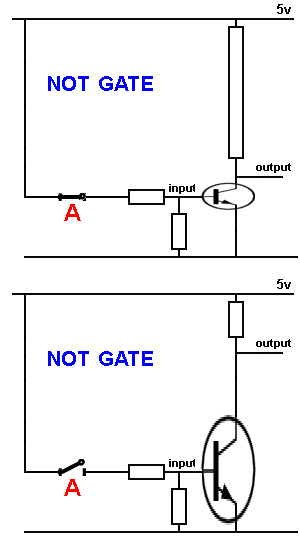
These operators are used to perform logical operations on the given expressions. There are 3 logical operators in C language. They are, logical AND (&&), logical OR (||) and logical NOT (!).
<table border="1" summary="Logical Operators in C programming" cellspacing="1" cellpadding="1">
<thead>
<tr>
<th scope="col">Operator</th>
<th scope="col">Meaning of Operator</th>
<th scope="col">Example</th>
</tr>
</thead>
<tbody>
<tr>
<td>&&</td>
<td>Logial AND. True only if all operands are true</td>
<td>If c = 5 and d = 2 then, expression `((c == 5) && (d > 5))` equals to 0.</td>
</tr>
<tr>
<td>||</td>
<td>Logical OR. True only if either one operand is true</td>
<td>If c = 5 and d = 2 then, expression `((c == 5) || (d > 5))` equals to 1.</td>
</tr>
<tr>
<td>!</td>
<td>Logical NOT. True only if the operand is 0</td>
<td>If c = 5 then, expression `! (c == 5)` equals to 0.</td>
</tr>
</tbody>
</table>
### Circuit Diagram of And (&&) Operator
[](https://www.technhit.in/wp-content/uploads/2016/09/AND-circuit.gif)
### Circuit Diagram of OR (||) Operator
[](https://www.technhit.in/wp-content/uploads/2016/09/Or-circuit.gif)
### Circuit Diagram of OR (!) Operator
[](https://www.technhit.in/wp-content/uploads/2016/09/NOT-Circuit.gif)
## 6
# Example Program:Using Logical Operatorc #include <stdio.h> int main() { int a = 5, b = 5, c = 10, result;
clrscr();
result = (a = b) && (c > b); // The expression returns True printf("(a = b) && (c > b) equals to %d \n", result);
result = (a = b) && (c < b); // The expression returns Fasle printf("(a = b) && (c < b) equals to %d \n", result);
result = (a = b) || (c < b); // The expression returns True printf("(a = b) || (c < b) equals to %d \n", result);
result = (a != b) || (c < b); // The expression returns False printf("(a != b) || (c < b) equals to %d \n", result);
result = !(a != b); // The expression returns True printf("!(a == b) equals to %d \n", result);
result = !(a == b); // The expression returns False printf("!(a == b) equals to %d \n", result);
return 0; getch(); }
**Output**c <samp>(a = b) && (c > b) equals to 1 (a = b) && (c < b) equals to 0 (a = b) || (c < b) equals to 1 (a != b) || (c < b) equals to 0 !(a != b) equals to 1 !(a == b) equals to 0 </samp>
## Conditional (ternary) Operators
The conditional (ternary) operator is a shortcut of *If* statement in c. It operates three operands thus it called ternary operator. The basic syntax of a Conditional operator is *condition* ? <em style="line-height: 1.5;">expression 1</em> : <em style="line-height: 1.5;">expression 2 </em>
[](https://www.technhit.in/wp-content/uploads/2016/09/Ternary-Operator.png)
## 7
# Example Program:Using Conditional (Ternary ) Operatorc #include<stdio.h> void main(); { age, flag; clrscr(); printf("Enter Your Age :); scanf("%d",&age); age>=18? flag=1 : flag=0; if(flag==1) printf("You are Young and Adult); else printf("You are junior "); getch();
}
Output:

Enter Your Age: 12

You are junior

## Bitwise Operators

As we discuss earlier post that, C is a middle-level language which has both high and low-level features. Here you can perform the bit-level operation using Bitwise operator.

C provides six operators for bit manipulation these are:

<table style="height: 200px;" width="416">
<tbody>
<tr>
<td>**Symbol**</td>
<td>**Operator**</td>
</tr>
<tr>
<td>&</td>
<td>bitwise AND</td>
</tr>
<tr>
<td>|</td>
<td>bitwise inclusive OR</td>
</tr>
<tr>
<td>^</td>
<td>bitwise XOR (eXclusive OR)</td>
</tr>
<tr>
<td><<</td>
<td>left shift</td>
</tr>
<tr>
<td>>></td>
<td>right shift</td>
</tr>
<tr>
<td>~</td>
<td>bitwise NOT (one's complement) (unary)</td>
</tr>
</tbody>
</table>

## 8

# Example Program:Using bitwise shift operator
c #include <stdio.h> #include <conio.h> void showbits(unsigned int x) { int i; for(i=(sizeof(int)*8)-1; i>=0; i--) (x&(1u<<i))?putchar('1'):putchar('0'); printf("\n"); }
int main() { int j = 5225, m, n; printf("The decimal %d is equal to binary - ", j); / assume we have a function that prints a binary string when given a decimal integer / showbits(j);
/ the loop for right shift operation / for ( m = 0; m <= 5; m++ ) { n = j >> m; printf("%d right shift %d gives ", j, m); showbits(n); } return 0; }
The output of the above program will bec The decimal 5225 is equal to binary - 0001010001101001 5225 right shift 0 gives 0001010001101001 5225 right shift 1 gives 0000101000110100 5225 right shift 2 gives 0000010100011010 5225 right shift 3 gives 0000001010001101 5225 right shift 4 gives 0000000101000110 5225 right shift 5 gives 0000000010100011
[mpaper title="Read more about Bitwise Operator" icon="fa-book"]

To better understand bitwise operator you have to learn boolean algebra and truth table of the gate.

### Bitwise AND

This makes more sense if we apply this to a specific operator. In C/C++/Java, the & operator is bitwise AND. The following is a chart that defines &<sup>1</sup>, defining AND on individual bits.

<table border="1" cellpadding="3">
<tbody>
<tr bgcolor="pink">
<td>  **x<sub>i</sub>**</td>
<td>  **y<sub>i</sub>**</td>
<td>**x<sub>i</sub> &<sup>1</sup> y<sub>i</sub>**</td>
</tr>
<tr align="center">
<td>0</td>
<td>0</td>
<td>0</td>
</tr>
<tr align="center">
<td>0</td>
<td>1</td>
<td>0</td>
</tr>
<tr align="center">
<td>1</td>
<td>0</td>
<td>0</td>
</tr>
<tr align="center">
<td>1</td>
<td>1</td>
<td>1</td>
</tr>
</tbody>
</table>
For instance, working with a byte (the char type):
c 01001000 & 10111000 = -------- 00001000
We can do an example of bitwise &. It's easiest to do this on 4-bit numbers, however.
<table border="1" cellpadding="3">
<tbody>
<tr bgcolor="pink">
<td>Variable</td>
<td>**b<sub>3</sub>**</td>
<td>**b<sub>2</sub>**</td>
<td>**b<sub>1</sub>**</td>
<td>**b<sub>0</sub>**</td>
</tr>
<tr align="center">
<td bgcolor="#aaffaa">**x**</td>
<td>1</td>
<td>1</td>
<td>0</td>
<td>0</td>
</tr>
<tr align="center">
<td bgcolor="#aaffaa">**y**</td>
<td>1</td>
<td>0</td>
<td>1</td>
<td>0</td>
</tr>
<tr align="center">
<td bgcolor="#aabbff">**z = x & y**</td>
<td>1</td>
<td>0</td>
<td>0</td>
<td>0</td>
</tr>
</tbody>
</table>

### Bitwise OR

The | operator is bitwise OR (it's a single vertical bar). The following is a chart that defines |<sup>1</sup>, defining OR on individual bits.

<table border="1" cellpadding="3">
<tbody>
<tr bgcolor="pink">
<td>  **x<sub>i</sub>**</td>
<td>  **y<sub>i</sub>**</td>
<td>**x<sub>i</sub> |<sup>1</sup> y<sub>i</sub>**</td>
</tr>
<tr align="center">
<td>0</td>
<td>0</td>
<td>0</td>
</tr>
<tr align="center">
<td>0</td>
<td>1</td>
<td>1</td>
</tr>
<tr align="center">
<td>1</td>
<td>0</td>
<td>1</td>
</tr>
<tr align="center">
<td>1</td>
<td>1</td>
<td>1</td>
</tr>
</tbody>
</table>
Similar to bitwise AND, bitwise OR only operates at the bit level. Its result is a 1 if one of the either bits is 1 and zero only when both bits are 0. Its symbol is '|' which can be called a **pipe**.
c 11001110 | 10011000 = 11011110
We can do an example of bitwise |. It's easiest to do this on 4-bit numbers, however.
<table border="1" cellpadding="3">
<tbody>
<tr bgcolor="pink">
<td>Variable</td>
<td>**b<sub>3</sub>**</td>
<td>**b<sub>2</sub>**</td>
<td>**b<sub>1</sub>**</td>
<td>**b<sub>0</sub>**</td>
</tr>
<tr align="center">
<td bgcolor="#aaffaa">**x**</td>
<td>1</td>
<td>1</td>
<td>0</td>
<td>0</td>
</tr>
<tr align="center">
<td bgcolor="#aaffaa">**y**</td>
<td>1</td>
<td>0</td>
<td>1</td>
<td>0</td>
</tr>
<tr align="center">
<td bgcolor="#aabbff">**z = x | y**</td>
<td>1</td>
<td>1</td>
<td>1</td>
<td>0</td>
</tr>
</tbody>
</table>

### Bitwise XOR

The ^ operator is bitwise XOR. The usual bitwise OR operator is *inclusive* OR. XOR is true only if exactly one of the two bits is true. The XOR operation is quite interesting, but we defer talking about the interesting things you can do with XOR until the next set of notes.

The following is a chart that defines ^<sup>1</sup>, defining XOR on individual bits.


<table border="1" cellpadding="3">
<tbody>
<tr bgcolor="pink">
<td>  **x<sub>i</sub>**</td>
<td>  **y<sub>i</sub>**</td>
<td>**x<sub>i</sub> ^<sup>1</sup> y<sub>i</sub>**</td>
</tr>
<tr align="center">
<td>0</td>
<td>0</td>
<td>0</td>
</tr>
<tr align="center">
<td>0</td>
<td>1</td>
<td>1</td>
</tr>
<tr align="center">
<td>1</td>
<td>0</td>
<td>1</td>
</tr>
<tr align="center">
<td>1</td>
<td>1</td>
<td>0</td>
</tr>
</tbody>
</table>
We can do an example of bitwise ^. It's easiest to do this on 4-bit numbers, however.
<table border="1" cellpadding="3">
<tbody>
<tr bgcolor="pink">
<td>Variable</td>
<td>**b<sub>3</sub>**</td>
<td>**b<sub>2</sub>**</td>
<td>**b<sub>1</sub>**</td>
<td>**b<sub>0</sub>**</td>
</tr>
<tr align="center">
<td bgcolor="#aaffaa">**x**</td>
<td>1</td>
<td>1</td>
<td>0</td>
<td>0</td>
</tr>
<tr align="center">
<td bgcolor="#aaffaa">**y**</td>
<td>1</td>
<td>0</td>
<td>1</td>
<td>0</td>
</tr>
<tr align="center">
<td bgcolor="#aabbff">**z = x ^ y**</td>
<td>0</td>
<td>1</td>
<td>1</td>
<td>0</td>
</tr>
</tbody>
</table>

### Bitwise NOT

There's only one unary bitwise operator, and that's bitwise NOT. Bitwise NOT flips all of the bits. There's not that much to say about it, other than it's not the same operation as the unary minus.The following is a chart that defines ~<sup>1</sup>, defining NOT on an individual bit.

<table border="1" cellpadding="3">
<tbody>
<tr bgcolor="pink">
<td>  **x<sub>i</sub>**</td>
<td>**~<sup>1</sup> x<sub>i</sub>**</td>
</tr>
<tr align="center">
<td>0</td>
<td>1</td>
</tr>
<tr align="center">
<td>1</td>
<td>0</td>
</tr>
</tbody>
</table>

We can do an example of bitwise ~. It's easiest to do this on 4 bit numbers (although only 2 bits are necessary to show the concept).

<table border="1" cellpadding="3">
<tbody>
<tr bgcolor="pink">
<td>Variable</td>
<td>**b<sub>3</sub>**</td>
<td>**b<sub>2</sub>**</td>
<td>**b<sub>1</sub>**</td>
<td>**b<sub>0</sub>**</td>
</tr>
<tr align="center">
<td bgcolor="#aaffaa">**x**</td>
<td>1</td>
<td>1</td>
<td>0</td>
<td>0</td>
</tr>
<tr align="center">
<td bgcolor="#aabbff">**z = ~x**</td>
<td>0</td>
<td>0</td>
<td>1</td>
<td>1</td>
</tr>
</tbody>
</table>

### Right shift >>

The symbol of right shift operator is >>. For its operation, it requires two operands. It shifts each bit in its left operand to the right. The number following the operator decides the number of places the bits are shifted (i.e. the right operand). Thus by doing ch >> 3 all the bits will be shifted to the right by three places and so on.

Example:

If the variable ch contains the bit pattern 11100101, then ch >> 1 will produce the result 01110010, and ch >> 2 will produce 00111001.
Here blank spaces are generated simultaneously on the left when the bits are shifted to the right. When performed on an unsigned type, the operation performed is a logical shift, causing the blanks to be filled by 0s (zeros). When performed on a signed type, the result is technically undefined and compiler dependent, however most compilers will perform an arithmetic shift, causing the blank to be filled with the sign bit of the left operand.

Right shift can be used to divide a bit pattern by 2 as shown:

i = 14; // Bit pattern 1110
j = i >> 1; // here we have the bit pattern shifted by 1 thus we get 111 = 7 which is 14/2

### Left shift <<

The symbol of left shift operator is <<. It shifts each bit in its left-hand operand to the left by the number of positions indicated by the right-hand operand. It works opposite to that of right shift operator. Thus by doing ch << 1 in the above example we have 11001010. Blank spaces generated are filled up by zeroes as above.

Left shift can be used to multiply an integer in multiples of 2 as in

int i = 4; /* bit pattern equivalent is 100 */
int j = i << 2; /* makes it 10000, which multiplies the original number by 4 i.e. 16 */

### Bitwise assignment operators

C provides a compound assignment operator for each binary arithmetic and bitwise operation (i.e. each operation which accepts two operands). Each of the compound bitwise assignment operators performs the appropriate binary operation and store the result in the left operand.

The bitwise assignment operators are as follows:
<table class="wikitable sortable jquery-tablesorter">
<thead>
<tr>
<th class="headerSort" tabindex="0" title="Sort ascending">Symbol</th>
<th class="headerSort" tabindex="0" title="Sort ascending">Operator</th>
</tr>
</thead>
<tbody>
<tr>
<td>`&=`</td>
<td>bitwise AND assignment</td>
</tr>
<tr>
<td>`|=`</td>
<td>bitwise inclusive OR assignment</td>
</tr>
<tr>
<td>`^=`</td>
<td>bitwise exclusive OR assignment</td>
</tr>
<tr>
<td>`<<=`</td>
<td>left shift assignment</td>
</tr>
<tr>
<td>`>>=`</td>
<td>right shift assignment</td>
</tr>
</tbody>
</table>

### Uses of Bitwise Operations

Occasionally, you may want to implement a large number of Boolean variables, without using a lot of space.

A 32-bit int can be used to stored 32 Boolean variables. Normally, the minimum size for one Boolean variable is one byte. All types in C must have sizes that are multiples of bytes. However, only one bit is necessary to represent a Boolean value.

You can also use bits to represent elements of a (small) set. If a bit is 1, then element **i** is in the set, otherwise it's not.You can use bitwise AND to implement set intersection, bitwise OR to implement set union.

### **Facts About Bitwise Operators**

Consider the expression **x + y**. Do either **x** or **y** get modified? The answer is no.

Most built-in binary operators do not modify the values of the arguments. This applies to logical operators too. They don't modify their arguments.

There are operators that do assignment such as +=, -=, *=, and so on. They apply to logical operators too. For example, |=, &=, ^=. Nearly all binary operators have a version with = after it.

### Summary

Bitwise operators only work on limited types: **int** and **char** (and variations of int). You can, with some casting, make it work on other types. These operators, in conjunction with bitshift operators, allow you to access and modify bits.

[/mpaper]

## Special Operators

Pointer(*), sizeof, comma(,) following you can categorise under special operator.

**Sizeof Operator**

The `sizeof` is an unary operator which returns the size of data (constant, variables, array, structure etc). it is widely used when you have to dynamic allocation of memory in your program.
c #include <stdio.h> int main() { int a, e[10]; float b; double c; char d; printf("Size of int=%lu bytes\n",sizeof(a)); printf("Size of float=%lu bytes\n",sizeof(b)); printf("Size of double=%lu bytes\n",sizeof(c)); printf("Size of char=%lu byte\n",sizeof(d)); printf("Size of integer type array having 10 elements = %lu bytes\n", sizeof(e)); return 0; }
**Output**c <samp>Size of int = 4 bytes Size of float = 4 bytes Size of double = 8 bytes Size of char = 1 byte Size of integer type array having 10 elements = 40 bytes</samp>
#include <stdio.h>
#include <stdlib.h>
int main(){
 int n,i,*ptr,sum=0;
 printf("Enter number of elements: ");
 scanf("%d",&n);
 ptr=(int*)malloc(n*sizeof(int)); //memory allocated using malloc
 if(ptr==NULL)
 {
 printf("Error! memory not allocated.");
 exit(0);
 }
 printf("Enter elements of array: ");
 for(i=0;i<n;++i)
 {
 scanf("%d",ptr+i);
 sum+=*(ptr+i);
 }
 printf("Sum=%d",sum);
 free(ptr);
 return 0;
}
In general, we use static allocation of memory in the declaration section of C program, but in a large project, you need to allocate memory at any moment and any point of your project. The above program we use malloc function that dynamically allocates memory and the sizeof operator tells malloc function that how much memory should allocate.
Pointer
A pointer is a variable which contains the address in memory of another variable. We can have a pointer to any variable type.
The unary or monadic operator & gives the ``address of a variable''.
The indirection or dereference operator **** gives the ``contents of an object pointed to* by a pointer''.
Declaration of a pointer variable:
<tt>int *pointer;</tt>
Unary, Binary, Ternary Operators in C
<table style="height: 1221px;" border="1" width="403"> <tbody> <tr> <td style="text-align: left;">Operator</td> <td>Name</td> <td>Type</td> </tr> <tr> <td>!</td> <td>Logical NOT</td> <td>Unary</td> </tr> <tr> <td>&</td> <td>Address-of</td> <td>Unary</td> </tr> <tr> <td>( )</td> <td>Cast Operator</td> <td>Unary</td> </tr> <tr> <td></td> <td>Pointer dereference</td> <td>Unary</td> </tr> <tr> <td>+</td> <td>Unary Plus</td> <td>Unary</td> </tr> <tr> <td>++</td> <td>Increment</td> <td>Unary</td> </tr> <tr> <td>-</td> <td>Unary negation</td> <td>Unary</td> </tr> <tr> <td>--</td> <td>Decrement 1</td> <td>Unary</td> </tr> <tr> <td>~</td> <td>complement</td> <td>Unary</td> </tr> <tr> <td>,</td> <td>Comma</td> <td>Binary</td> </tr> <tr> <td>!=</td> <td>Inequality</td> <td>Binary</td> </tr> <tr> <td>%</td> <td>Modulus</td> <td>Binary</td> </tr> <tr> <td>%=</td> <td>Modulus assignment</td> <td>Binary</td> </tr> <tr> <td>&</td> <td>Bitwise AND</td> <td>Binary</td> </tr> <tr> <td>&&</td> <td>Logical AND</td> <td>Binary</td> </tr> <tr> <td>&=</td> <td>Bitwise AND assignment</td> <td>Binary</td> </tr> <tr> <td></td> <td>Multiplication</td> <td>Binary</td> </tr> <tr> <td>=</td> <td>Multiplication assignment</td> <td>Binary</td> </tr> <tr> <td>+</td> <td>Addition</td> <td>Binary</td> </tr> <tr> <td>+=</td> <td>Addition assignment</td> <td>Binary</td> </tr> <tr> <td>-</td> <td>Subtraction</td> <td>Binary</td> </tr> <tr> <td>-=</td> <td>Subtraction assignment</td> <td>Binary</td> </tr> <tr> <td>-></td> <td>Member selection</td> <td>Binary</td> </tr> <tr> <td>-></td> <td>Pointer-to-member selection</td> <td>Binary</td> </tr> <tr> <td>/</td> <td>Division</td> <td>Binary</td> </tr> <tr> <td>/=</td> <td>Division assignment</td> <td>Binary</td> </tr> <tr> <td><</td> <td>Less than</td> <td>Binary</td> </tr> <tr> <td><<</td> <td>Left shift</td> <td>Binary</td> </tr> <tr> <td><<=</td> <td>Left shift assignment</td> <td>Binary</td> </tr> <tr> <td><=</td> <td>Less than or equal to</td> <td>Binary</td> </tr> <tr> <td>=</td> <td>Assignment</td> <td>Binary</td> </tr> <tr> <td>==</td> <td>Equality</td> <td>Binary</td> </tr> <tr> <td>></td> <td>Greater than</td> <td>Binary</td> </tr> <tr> <td>>=</td> <td>Greater than or equal to</td> <td>Binary</td> </tr> <tr> <td>>></td> <td>Right shift</td> <td>Binary</td> </tr> <tr> <td>>>=</td> <td>Right shift assignment</td> <td>Binary</td> </tr> <tr> <td>^</td> <td>Exclusive OR</td> <td>Binary</td> </tr> <tr> <td>^=</td> <td>Exclusive OR assignment</td> <td>Binary</td> </tr> <tr> <td>|</td> <td>Bitwise inclusive OR</td> <td>Binary</td> </tr> <tr> <td>|=</td> <td>Bitwise inclusive OR assignment</td> <td>Binary</td> </tr> <tr> <td>||</td> <td>Logical OR</td> <td>Binary</td> </tr> <tr> <td>? :</td> <td>Conditional Operators</td> <td>Ternary</td> </tr> </tbody> </table>
C Operator Precedence Table
<blockquote>Here is the lists of C operators in order to precedence (highest to lowest). Their associativity indicates in what order operators of equal precedence in an expression are applied.</blockquote>
<table border="1" width="90%" cellspacing="0" cellpadding="2"> <tbody> <tr> <th>
Operator
</th> <th>Description</th> <th>
Associativity
</th> </tr> <tr> <td align="center">( ) [ ] . -> ++ --</td> <td>Parentheses (function call) (see Note 1) Brackets (array subscript) Member selection via object name Member selection via pointer Postfix increment/decrement (see Note 2)</td> <td valign="top">
left-to-right
</td> </tr> <tr> <td align="center">++ -- + - ! ~ (type) & sizeof</td> <td>Prefix increment/decrement Unary plus/minus Logical negation/bitwise complement Cast (convert value to temporary value of type) Dereference Address (of operand) Determine size in bytes on this implementation</td> <td align="center" valign="top">right-to-left</td> </tr> <tr> <td align="center"> / %</td> <td>Multiplication/division/modulus</td> <td align="center" valign="top">left-to-right</td> </tr> <tr> <td align="center">+ -</td> <td>Addition/subtraction</td> <td align="center" valign="top">left-to-right</td> </tr> <tr> <td align="center"><< >></td> <td>Bitwise shift left, Bitwise shift right</td> <td align="center" valign="top">left-to-right</td> </tr> <tr> <td align="center">< <= > >=</td> <td>Relational less than/less than or equal to Relational greater than/greater than or equal to</td> <td align="center" valign="top">left-to-right</td> </tr> <tr> <td align="center">== !=</td> <td>Relational is equal to/is not equal to</td> <td align="center" valign="top">left-to-right</td> </tr> <tr> <td align="center">&</td> <td>Bitwise AND</td> <td align="center" valign="top">left-to-right</td> </tr> <tr> <td align="center">^</td> <td>Bitwise exclusive OR</td> <td align="center" valign="top">left-to-right</td> </tr> <tr> <td align="center">|</td> <td>Bitwise inclusive OR</td> <td align="center" valign="top">left-to-right</td> </tr> <tr> <td align="center">&&</td> <td>Logical AND</td> <td align="center" valign="top">left-to-right</td> </tr> <tr> <td align="center">| |</td> <td>Logical OR</td> <td align="center" valign="top">left-to-right</td> </tr> <tr> <td align="center">? :</td> <td>Ternary conditional</td> <td align="center" valign="top">right-to-left</td> </tr> <tr> <td align="center">= += -= *= /= %= &= ^= |= <<= >>=</td> <td>Assignment Addition/subtraction assignment Multiplication/division assignment Modulus/bitwise AND assignment Bitwise exclusive/inclusive OR assignment Bitwise shift left/right assignment</td> <td align="center" valign="top">right-to-left</td> </tr> <tr> <td>
,
</td> <td>Comma (separate expressions)</td> <td align="center" valign="top">left-to-right</td> </tr> <tr> <td colspan="3"> <blockquote> <dl> <dt>Note 1:</dt> <dd>Parentheses are also used to group sub-expressions to force a different precedence; such parenthetical expressions can be nested and are evaluated from inner to outer.</dd> <dt>Note 2:</dt> <dd>Postfix increment/decrement have high precedence, but the actual increment or decrement of the operand is delayed (to be accomplished sometime before the statement completes execution). So in the statement *y = x z++; the current value of z* is used to evaluate the expression (i.e., *z++ evaluates to z) and z only incremented after all else is done.</dd> </dl> </blockquote> </td> </tr> </tbody> </table>