
Installing VMware Tools on Ubuntu
**VMWare tools** is a set of driver and utilities that enhance the performance of a guest system. And make the smooth interaction between a host system and the guest system. For example, the guest ...
Key Architecture Takeaways
- ›Point 1: Production blueprint for Installing VMware Tools on Ubuntu on Linux infrastructure.
- ›Point 2: Covers root privilege management, daemon supervision via systemd, and secure file operations.
- ›Point 3: Applies to LTS releases (Ubuntu 24.04/22.04 LTS, Debian 12 Bookworm).
Enterprise Compatibility Update (2026 / LTS)
While these fundamentals apply directly to existing deployments, modern installations on Ubuntu 22.04 and 24.04 LTS use systemd-resolved, nftables for packet filtering, and modern OpenSSH 9+ with Ed25519 cryptography.
VMWare tools is a set of driver and utilities that enhance the performance of a guest system. And make the smooth interaction between a host system and the guest system. For example, the guest automatically adjusts screen resolution, coping file and text from host to guest and its vice versa moreover it enhance following utilities.
- It improves graphics performance and Windows Aero on operating systems that support Aero. - The Unity feature, which enables an application in a virtual machine to appear on the host desktop like any other application window. - Shared folders between host and guest file systems. - Improved mouse performance. - Synchronization of the clock in the virtual machine with the clock on the host or client desktop. - Scripting that helps automate guest operating system operations.
Though It's not mandatory to install this tools on your VM guest. A VM guest can run without this. But installing this tools you can take advantage of above benefits.
Install VMware Tools on Ubuntu 16.04.1 LTS
See on Youtube:
After installing your ubuntu guest on VMware you need to update all system package after that proceed for install VM tools. To get update your system package opens a terminal then type the following command.
sudo apt-get updateGo to VM Menu on VMware host -> Click on Install VMware Tools
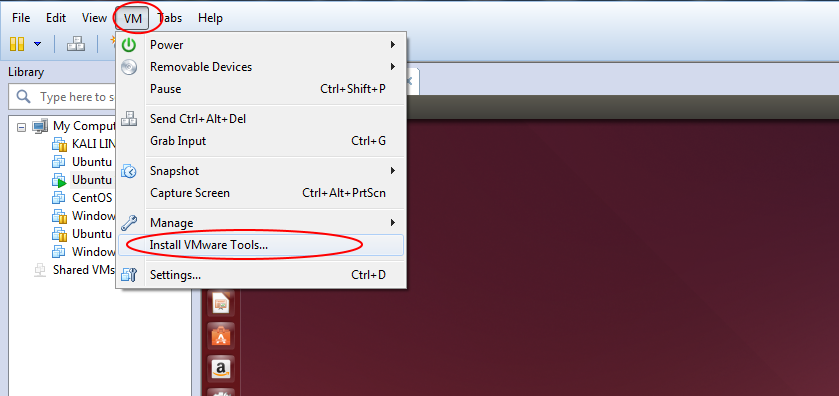
After Click on Install VM Tools, you will see that VM tools mounted on ubuntu CD-ROM
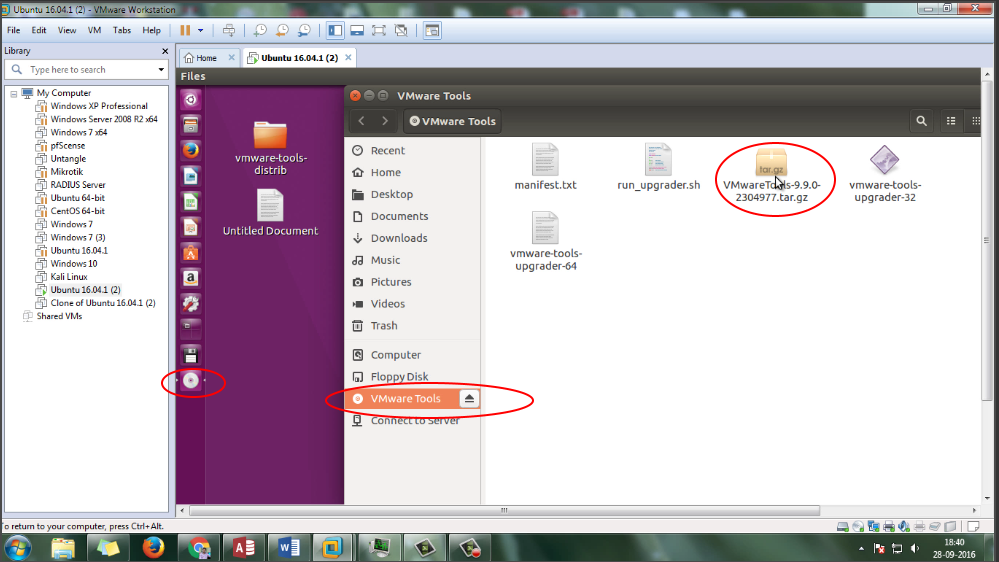
After Opening CD-ROM you will see the VMware tools package ter.gz file
Copy and extract gz file as your desire location. In my case, I use Download directory.
sudo cp /media/technhit/VMware tools/VMwareTools-9.6.1-1378637.tar.gz /Downloads
cd /Downloads
sudo tar -xvzf VMwareTools-9.6.1-1378637.tar.gz
After that enter newly extract directory vmware-tools-distrib
cd /Downloads/vmware-tools-distrib Installing VMware Tools on Ubuntu
Now begin the install process
sudo vmware-install.pl
Follow the on-screen directions accepting all the default responses which asking during installations. Eventually, Reboot the guest os and enjoy!